Overview
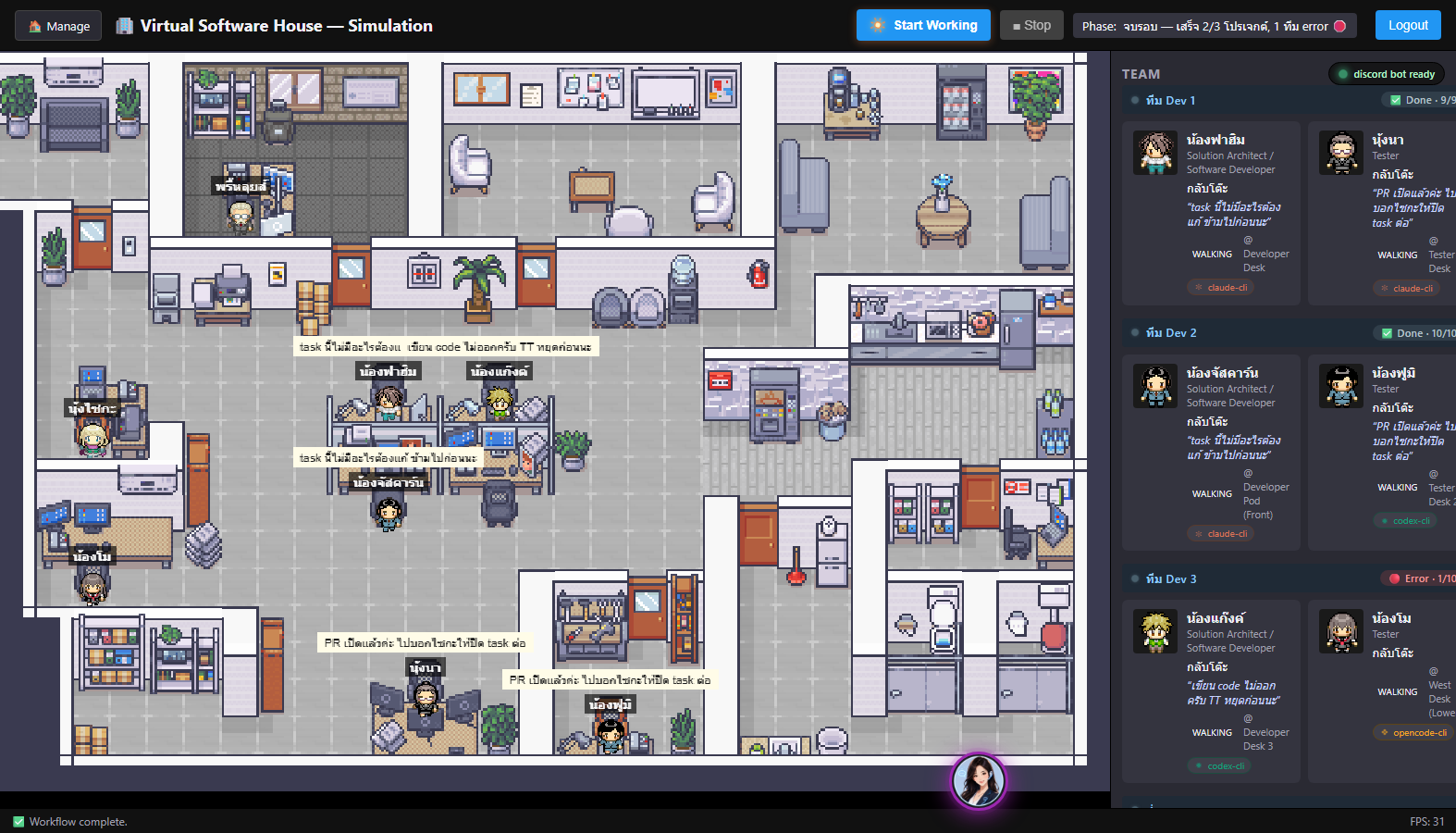
Web Virtual Office explores the idea of representing a software house as a living system. Each role in the team is visualized as a character inside a virtual workspace, helping people see how requirements move from an initial idea into structured work, development, testing, and coordination.
This project is not just a technical demo. It is a learning experiment about how software engineering, AI-assisted workflows, and project management can be explained in a more visual and approachable way.
Why I Built This
I built this project to explore a simple but exciting question: what if a software house could be experienced as a living web application?
Most software workflows are invisible to people outside the development team. Requirements live in task boards, decisions live in conversations, and progress is often hidden behind status labels. Web Virtual Office tries to make that workflow easier to understand by turning it into something people can see.
The goal is to share an idea, not just a product: software development can be visual, educational, and inspiring when the workflow is designed as an experience.
How It Works
The virtual office represents a software team through role-based characters. Each character has a clear responsibility in the delivery process, such as project management, solution design, development, testing, or coordination.
A requirement can enter the system, become a structured task, move through the workflow, and be reflected visually in the office state. This creates a bridge between project management tools, AI-assisted task handling, and an interactive web interface.
The workflow
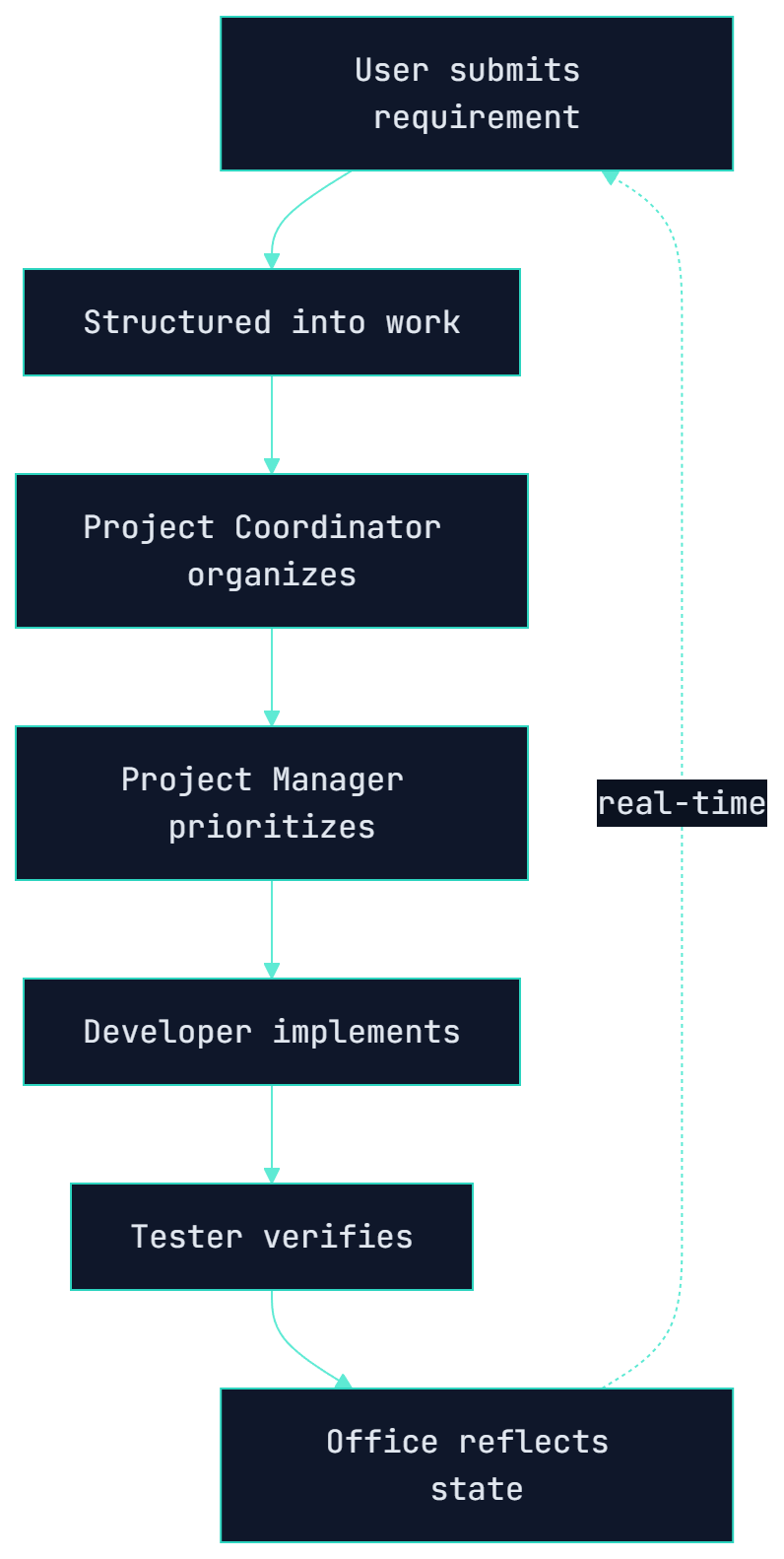
- 1A user submits an idea, requirement, question, or bug.
- 2The system interprets the input and prepares it as structured work.
- 3A project coordinator role helps organize the task.
- 4A project manager role selects and prioritizes work.
- 5A developer role handles solution design and implementation.
- 6A tester role verifies the result.
- 7The virtual office reflects the state of the workflow visually.
The Virtual Team
The project uses character-based roles to make the software workflow more memorable and easier to understand. Each character represents a common responsibility in a software house.
Project Manager
Responsible for understanding priorities, selecting work, and guiding the delivery flow.
Solution Architect / Developer
Responsible for analyzing requirements, designing the solution, and implementing features.
Tester
Responsible for checking quality, validating behavior, and helping the team catch issues before delivery.
Project Coordinator
Responsible for receiving input, organizing information, and keeping the workflow connected.
Key Features
- Interactive virtual office interface
- Role-based software house characters
- Requirement intake concept
- Task workflow visualization
- Real-time office state concept
- AI-assisted workflow thinking
- ClickUp-style project management integration concept
- Clean and expandable architecture
- Built for learning, storytelling, and inspiration
Real Working Features
Beyond the visual metaphor, the office runs real integrations. Here is how the main flows actually work.
Saika Intake → ClickUp
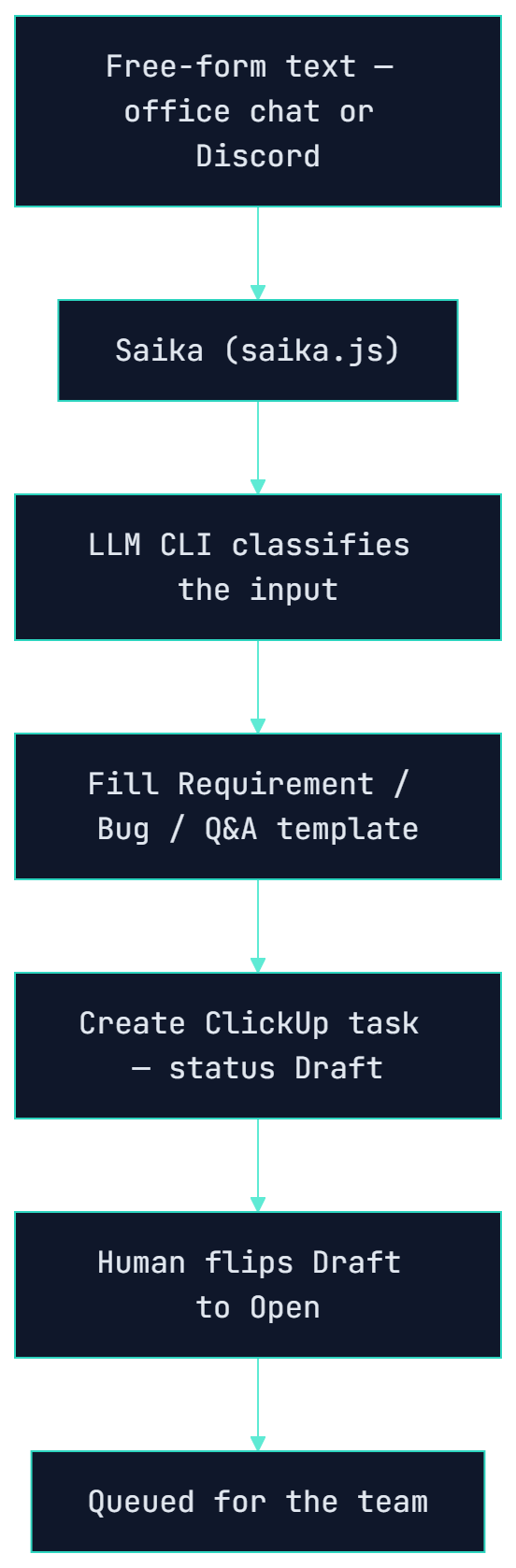
Anyone can drop a free-form message — a feature idea, a bug report, or a question — to Saika, the project coordinator. Saika runs the text through an LLM CLI that classifies it as a Requirement, Bug, or Q&A, fills the matching template, and creates a real ClickUp task.
New tasks land as Draft on purpose. A human reviews and flips them to Open — the signal the team uses to queue the work. The same intake pipeline powers both the in-office Saika chat and the Discord command.
Discord Bot — Intake & Control
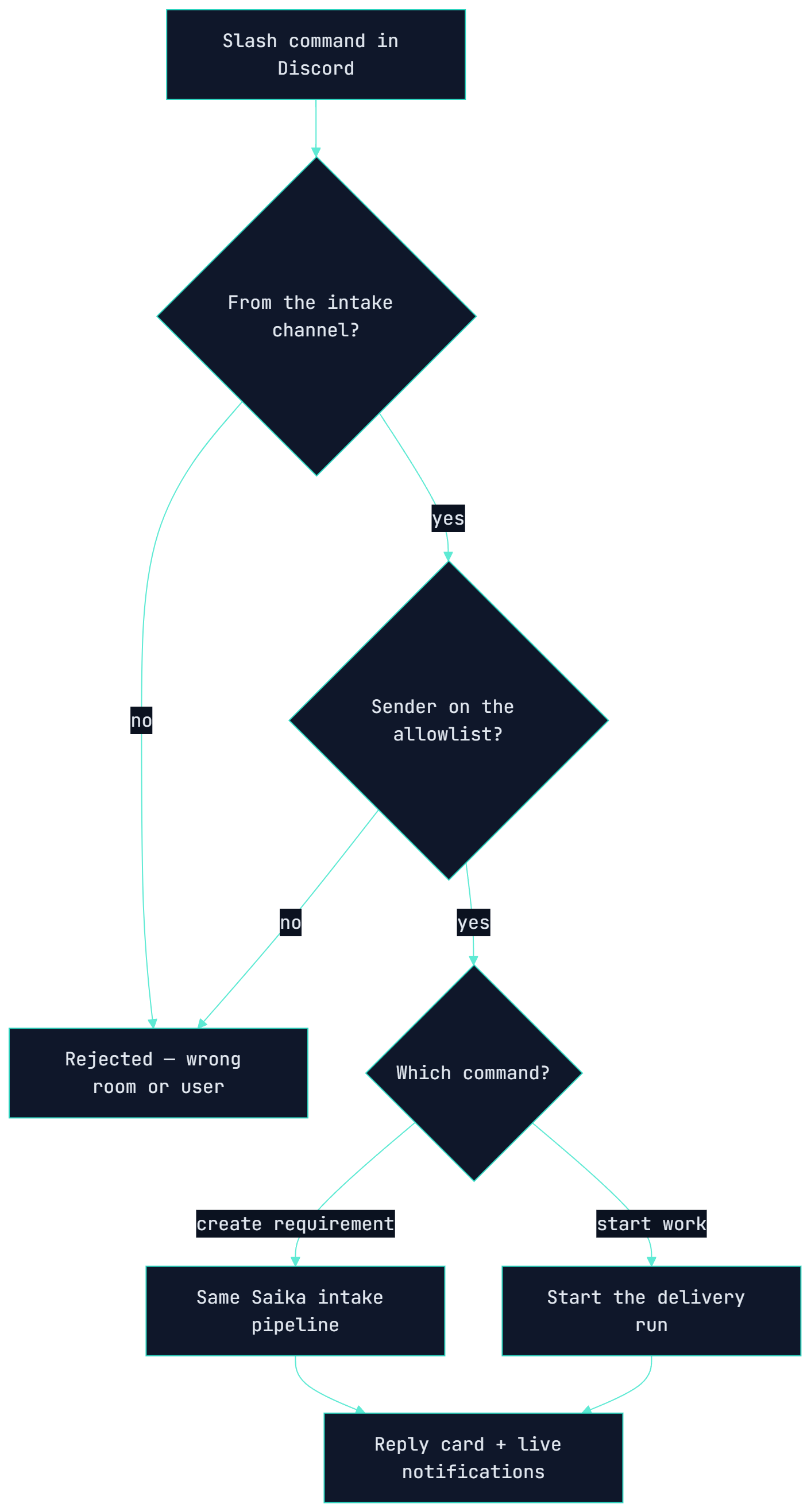
A Discord bot is online for exactly as long as the Virtual Office is running. It exposes two slash commands: /kiyo_create_requirement runs free text through the same Saika intake pipeline, and /kiyo-saika-startwork kicks off a delivery run — the same action as the Start Working button.
Both commands are gated twice: the message must come from the list’s configured intake channel, and the sender must be on that list’s allowlist. Saika replies with rich result cards, and the workflow streams best-effort notifications back to the channel as it progresses.
Agents That Write Real Code (Pluggable LLM CLIs)
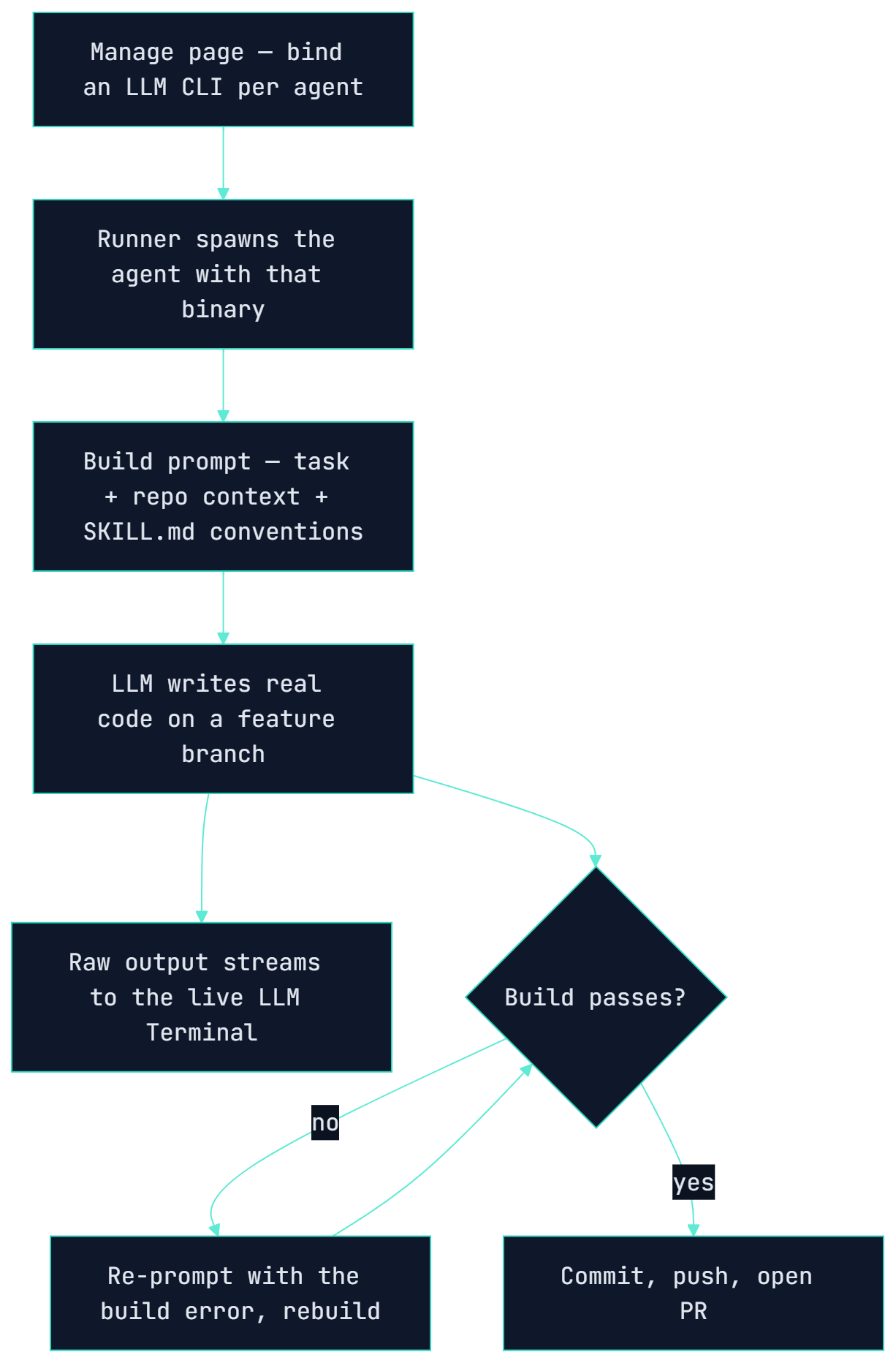
The developer agents don’t fake it — each one drives a real LLM coding CLI to write code. On the Manage page you bind a provider per agent (Codex, Claude, Gemini, OpenCode, or Antigravity) and swap it with no code change. The runner spawns that binary, feeds it the task plus the repo’s own coding conventions, and the model writes the feature on its own branch.
Everything the model does streams live to a floating LLM Terminal on the office screen, so you watch the code being written in real time. A build gate re-prompts the model with the exact build error and rebuilds until it passes before anything is committed — and a watchdog kills a wedged run so it can never hang the office.
Automated Delivery Loop (ClickUp + GitHub)
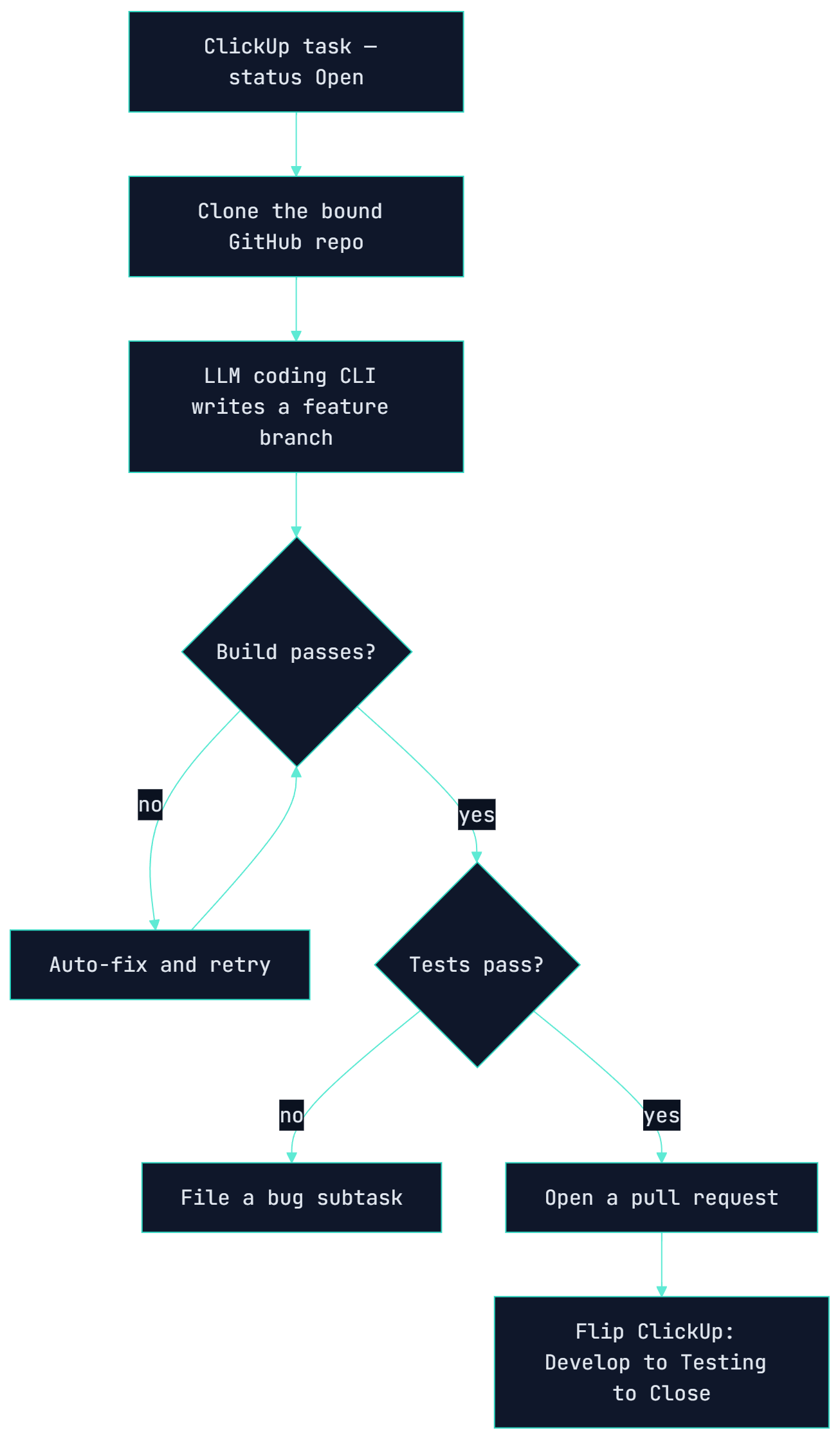
Once a task is Open, the team runs a real delivery loop: clone the bound GitHub repo, drive an LLM coding CLI to produce a feature branch, pass a build gate with automatic fix-and-retry, run the project’s own tests, open a pull request, and flip the ClickUp status from Develop to Testing to Close.
If the build or tests fail, a bug subtask is filed instead of a silent failure, and an Excel test-data report is attached to the ClickUp task. ClickUp and GitHub stay the source of truth — the database only keeps configuration and run history.
Architecture Thinking
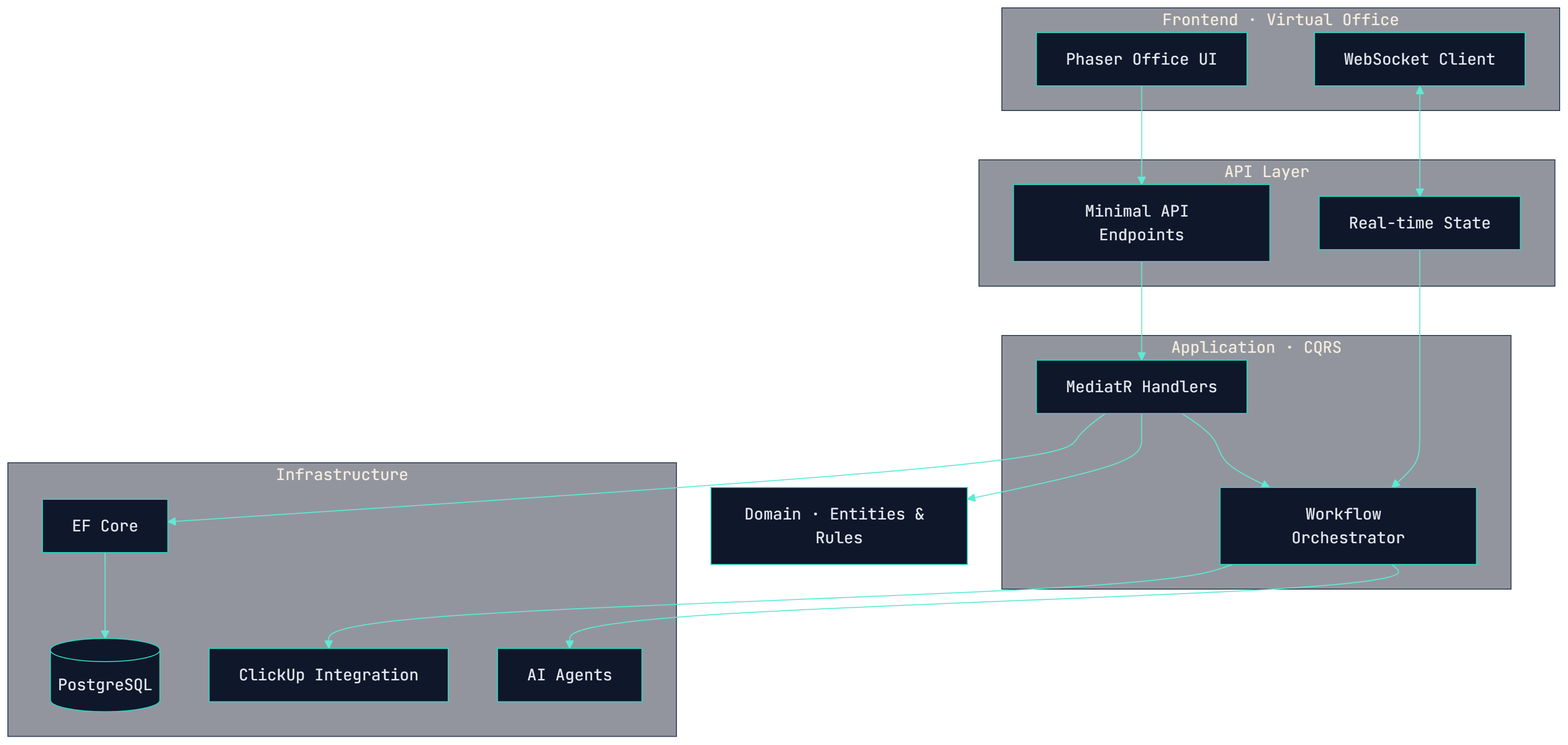
The project is designed with separation of concerns in mind. The backend follows a clean structure where business logic, application use cases, infrastructure, and API endpoints are kept separate. This makes the system easier to reason about and safer to expand over time.
The frontend focuses on presenting the virtual office experience, while the backend manages state, workflow, integrations, and coordination logic. This separation allows the project to grow from a simple showcase into a more capable interactive system.
Architecture
A Clean Architecture backend with CQRS, real-time state, and AI / ClickUp integrations behind an interactive office frontend.
Delivery Workflow
How a requirement travels through the role-based team — from intake to a visually reflected office state.
Technology Stack
The project combines backend architecture, real-time communication, interactive frontend rendering, and third-party workflow integration to create a visual software house experience.
- .NET
- Clean Architecture
- CQRS
- MediatR
- PostgreSQL
- WebSocket
- JavaScript
- Phaser
- ClickUp Integration
- AI Agents
Lessons Learned
- A workflow becomes easier to understand when people can see it moving.
- AI agents work better when each role has clear responsibility and boundaries.
- Project management concepts can be taught through interaction, not only documentation.
- Clean architecture helps experimental projects stay maintainable.
- A showcase project can be both technical and emotional when it tells the story behind the build.
- Building a visual metaphor for software work can make complex systems feel more human.
What's Next
- Add real screenshots and video walkthroughs
- Add a public live demo experience
- Improve the project detail storytelling
- Add architecture diagrams and workflow diagrams
- Expand the virtual team with richer agent behavior
- Connect more deeply with GitHub and project management workflows
- Add more showcase projects to the site
- Share development notes as articles or build logs